Text to Font Generator – Convert Your Text into Stylish Fonts
Text is more than just words; it is a reflection of personality, mood, and creativity. In a digital space where first impressions matter, stylish fonts help your message feel more expressive and memorable.
Whether you are updating a social media bio, crafting a unique username, or adding flair to everyday conversations, the right font can instantly elevate your text. That is where a Text to Font Generator becomes useful.
In the article below, we will explore what a Text to Font Generator is, how it works, the types of fonts available, and simple steps to convert your text effortlessly.
What Is a Text to Font Generator?
A Text to Font Generator is an online tool that converts regular, plain text into different stylish font designs. Instead of changing the actual font file on a device, it uses special characters to create text that visually appears in various font styles.
These converted fonts can be copied and pasted anywhere online. This means you can use them on social media profiles, posts, messaging apps, usernames, and even creative designs without installing any software. Because of this simplicity, Text to Font Generators are popular among casual users, gamers, content creators, and marketers alike.
How a Text to Font Generator Works? – The Basic Mechanism Base!
Understanding how the tool works makes it easier to use and trust. Behind the scenes, the process is simple but effective. Read the following details and make yourself clear.
- Unicode-Based Font Conversion Explained
Text-to-Font Generators rely on Unicode, which is a universal character encoding system used across the internet. Unicode contains thousands of characters, symbols, and letter variations that look like different fonts.
When you enter text into a generator, the tool replaces standard letters with similar-looking Unicode characters. For example, a normal “A” might be replaced with a bold, cursive, or decorative Unicode version. Since Unicode is widely supported, the stylish text usually appears correctly on most platforms.
- Copy-and-Paste Font Technology
Once your text is converted, the tool allows you to copy it instantly. You can then paste it into any supported platform. This copy-and-paste functionality eliminates complexity and makes font styling accessible even for beginners.
Key Features of a Text to Font Generator
A high-quality and reliable Text in Font Generator offers features designed to improve user experience and creativity. Below is the detailed feature list for text to font generator:
Multiple Stylish Font Options
You can choose from dozens of font styles, ranging from elegant scripts to bold and modern designs at this website. This variety ensures flexibility for different needs.
Instant Font Preview
As you type, the tool instantly shows your text in multiple font styles. This real-time preview saves time and helps you select the perfect look.
One-Click Copy and Paste
With just one click, your selected font is copied. This makes the entire process quick and frustration-free.
Mobile and Desktop Compatibility
The tool works smoothly on smartphones, tablets, laptops, and desktops, ensuring accessibility for all users.
No Download or Signup Required
You can use the generator directly in your browser without installing apps or creating an account.
Free and Easy to Use
Text to Font Generator is completely free, that make it ideal for frequent and casual use.
Works Across All Platforms
The generated fonts can be used on Instagram, Facebook, Twitter, WhatsApp, Discord, gaming platforms, and more.
Simple Interface and Fast Results
A clean layout and fast loading ensure that users can convert text without confusion or delay.
Wide Font Collection
A large selection allows experimentation, helping users find styles that match their personality or brand.
Reliable and User-Friendly Experience
Consistent performance ensures that the tool works whenever you need it.
See also: Exploring the Latest Trends in Smart Home Technology
Types of Stylish Fonts You Can Generate with Text to Font Generator
Different font styles serve different creative purposes.
- Fancy and Decorative Fonts: These fonts are ideal for captions, quotes, and profile descriptions where creativity matters most.
- Bold, Italic, and Script Fonts: These styles help emphasise important text and make messages stand out visually.
- Symbol and Emoji-Based Fonts: By mixing text with symbols and emojis, these fonts add fun and expressiveness to content.
- Cool Fonts for Usernames and Bios: Unique fonts help usernames look distinctive in games, forums, and social media platforms.
How to Convert Text into Stylish Fonts:
Step-by-Step Guide to Use Text To Font
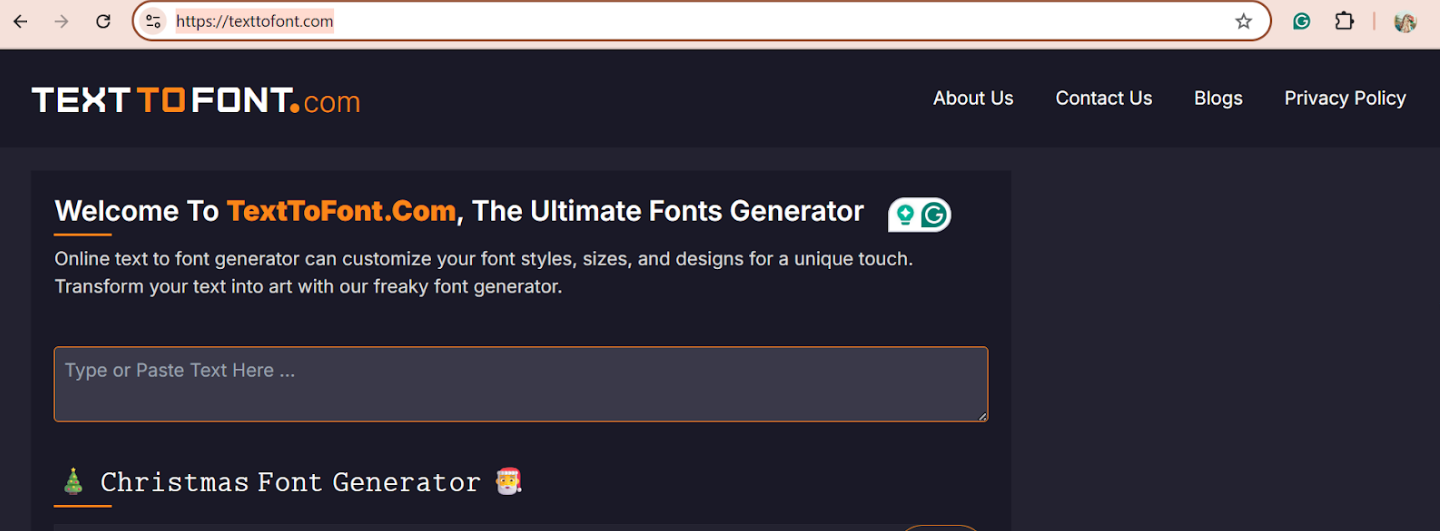
Converting your text into stylish fonts with TextToFont.com is quick, simple, and beginner-friendly. Below is a clear, step-by-step breakdown of the exact process, explained in easy language so anyone can follow it without confusion.
Step 1: Open the TextToFont Website
Start by opening your browser and visiting Text To Font. The website loads instantly and does not require any login or signup. You will see a clean and simple interface designed for easy use.
Step 2: Locate the Text Input Box
On the main page, you will find a large text input box. This is where you enter the text you want to convert. The input area is clearly visible and placed at the top for convenience.
Step 3: Type or Paste Your Text
Now, type your text directly into the input box or paste text you have copied from another source. As soon as you enter the text, the tool begins processing it automatically.

Step 4: View Instant Font Previews
Once your text is entered, multiple stylish font versions appear instantly below the input box. Each version shows your text in a different font style, allowing you to preview all options in real time.

Step 5: Scroll and Explore Font Styles
Scroll down to explore the full list of available fonts. You will find fancy fonts, bold styles, script fonts, and symbol-based designs. Take your time to choose the one that best matches your purpose.
Step 6: Select Your Preferred Font Style
When you find a font you like, simply focus on that style. There is no need to select or highlight text manually; the tool automatically prepares it for copying.
Step 7: Click the Copy Button
Next to each font style, you will see a copy button. Click this button to instantly copy the styled text to your clipboard. The process is fast and requires only one click.

Step 8: Paste the Stylish Text Anywhere
Finally, paste the copied text wherever you want to use it. This can be on social media profiles, posts, chat apps, gaming usernames, bios, or any supported platform.
Step 9: Repeat for More Styles
If you want to try another font style, simply go back and copy a different one. You can generate and use as many styles as you like without any limits.
Conclusion
A Text to Font Generator is a powerful yet simple tool that enhances how text appears online. Using Unicode-based font styles, it allows users to create stylish text that works across platforms without technical effort.
Whether you want to personalise your social media, design creative content, or stand out in online communities, Text To Font offers a fast, free, and user-friendly solution. With its wide font collection and smooth performance, it turns ordinary text into something visually engaging and memorable.
Frequently Asked Questions
Can I Use These Fonts Everywhere?
Most Unicode-based fonts work across major platforms, but appearance may vary slightly depending on device and app support.
Is Text To Font Safe to Use?
Yes, it is safe and secure. The tool does not collect personal data or require login credentials.
Do Stylish Fonts Affect SEO or Text Search?
Stylish fonts are visual elements. Important SEO content should remain in standard text, as search engines may not fully read Unicode characters.
Can I Use Stylish Fonts for Professional Content?
Yes, but it is best to use them selectively to maintain readability and professionalism.